What I Learned Building a Smart Grid Pipeline on Databricks Free Edition
I spent the last weekend building a smart grid meter telemetry pipeline on Databricks Free Edition. The free tier is restrictive with serverless-only compute, a single DLT pipeline, no classic clusters. But it turns out you can build a real medallion architecture with data quality enforcement, SCD modeling, dual-lane ingestion, and Terraform-managed infrastructure within those constraints.
The answer is a lot. The whole medallion architecture works in there, with DQX quality rules, SCD modeling, dual-lane ingestion, and Terraform managing everything from the catalog down to the cron jobs. The friction came from features that quietly assume a paid tier underneath them, and from one streaming-checkpoint concept that sneaks up on you when the pipeline shape changes.
What follows is the architecture, the design choices, and the specific errors I hit along the way. If you’re Googling one of those errors, hopefully you land here.
What the pipeline does
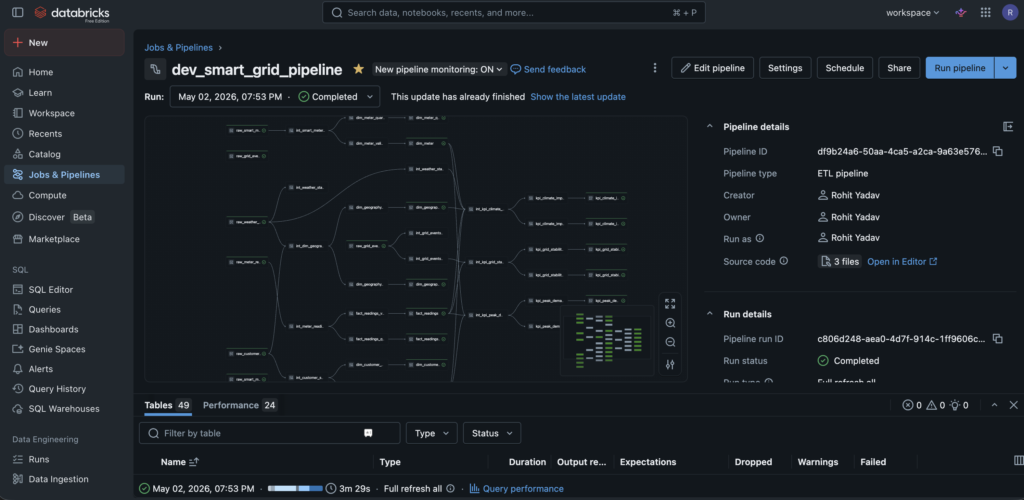
Smart grid meters generate data continuously: meter readings, weather observations, customer accounts, device metadata, and grid events. The pipeline needs to handle two very different ingestion patterns. First, a one-time historical bulk load. Second, a near-real-time (NRT) stream that ticks every 15 minutes. On top of that, it cleans and conforms raw data, enforces quality rules with quarantine for bad rows, models dimensions and facts with SCD Type 1 and Type 2, and produces three business KPIs.
The whole thing runs inside a single Lakeflow Declarative Pipeline (DLT) defined by three notebooks: bronze, silver, and gold.
Architecture at a glance
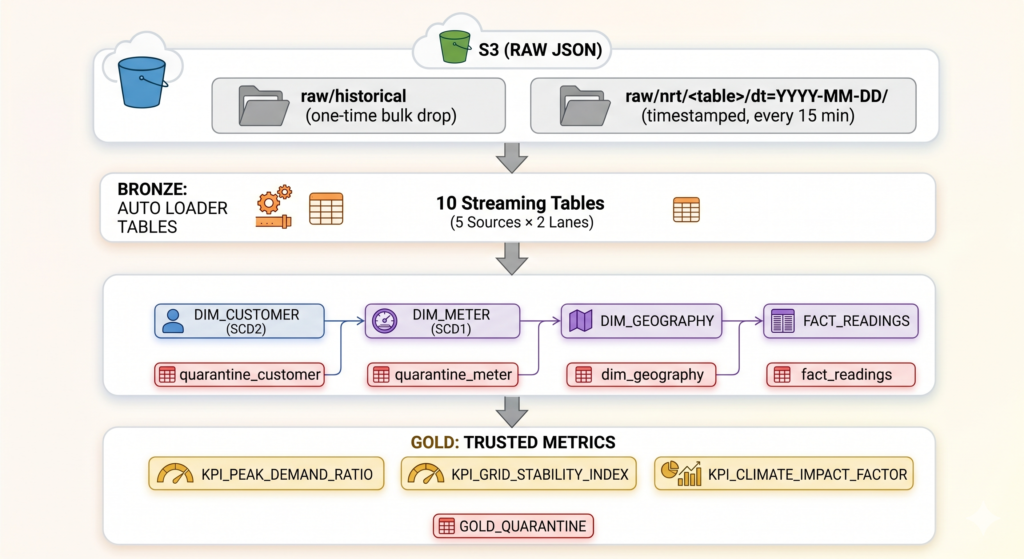
DLT reads all three notebooks, builds a DAG from the @dlt.table and @dlt.view decorators, and runs everything in topological order. Terraform manages the catalog, schemas, pipeline definition, jobs, and file uploads.
Why Terraform instead of Git Folders
Databricks gives us two ways to get code into the workspace. Git Folders (formerly Repos) clone a repo directly into the workspace and sync on merge via a GitHub Action. Terraform uploads files through the Workspace REST API as part of terraform apply.
I went with Terraform because this project deploys more than notebooks. The Unity Catalog, the three schemas, the DLT pipeline definition, and the NRT cron job are all infrastructure that Git Folders can’t create. If I used Git Folders for notebooks and Terraform for everything else, I’d have two tools competing for the same workspace paths and two sources of truth for rollback. Simpler to let one tool own it all.
The downside is that the workspace has no idea the code came from Git. There’s no commit history or branch awareness in the UI. Rollback means re-applying an older Terraform revision.
The dual-lane ingestion pattern
This was the hardest design problem. How do you merge a one-time historical dump with an ongoing real-time stream?
I landed on two bronze tables per source. For example, raw_meter_readings handles NRT data and raw_meter_readings_historical handles the bulk load. Silver unions them when a merge_historical flag is set to true, and reads only NRT when it’s false:
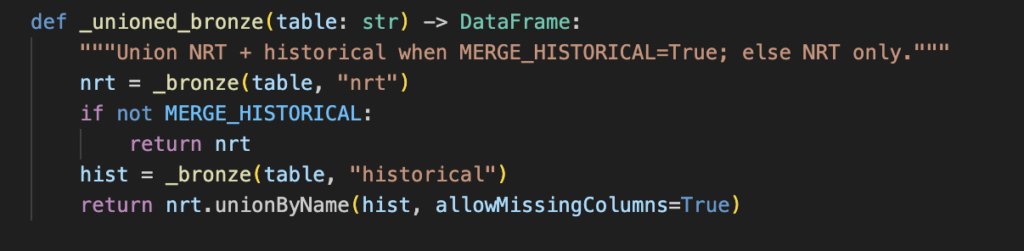
The pipeline lives in two phases. During backfill, silver reads from both lanes (two streaming sources). During steady state, it reads only NRT (one streaming source). The transition between them requires a --full-refresh to rewrite Spark’s streaming checkpoints from the two-source shape to the one-source shape. More on why below.
I considered backfilling through the NRT path (just dump historical files into raw/nrt/), but that loses lineage. The is_not_historical_data flag powers SCD2 ordering so that NRT data always wins ties against historical records. Without separate lanes, you can’t distinguish between the two.
Data quality with DQX
Quality rules live in YAML files, one per table:
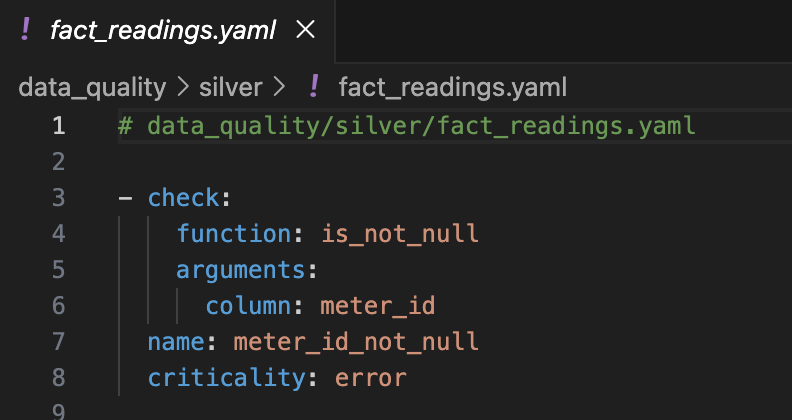
At runtime, databricks-labs-dqx splits each DataFrame into valid rows and quarantine rows. Errors route to quarantine; warnings annotate but keep the row. Both halves land in separate Delta tables (silver.dim_customer and silver.dim_customer_quarantine), so you get auditability without polluting downstream consumers.
A small but important optimization: the _checked_view helper creates two DLT views (valid and quarantine) from the same DQX call. Without this, each consuming table would re-run the quality checks independently, doubling compute.
DQX runs at both silver and gold. Silver catches data issues (nulls, bad formats, orphan keys). Gold catches business logic issues (implausible ratios, out-of-range KPIs). Two enforcement points catch different categories of problems.
SCD2 ordering across two lanes
DLT’s apply_changes handles SCD2 natively, but I needed to order records correctly when both historical and NRT data report the same key. The trick is a composite struct for sequence_by:
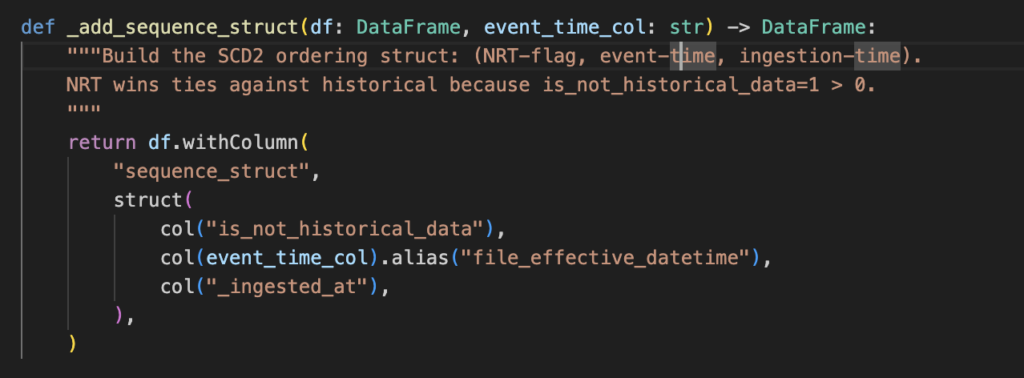
Lexicographic ordering across three tiers: lane, then event time, then ingestion time. NRT always wins. I considered nudging NRT timestamps forward by a small epsilon instead, but that conflates lane semantics with time values and breaks when event timestamps are imprecise.
Streaming vs batch views: the split I didn’t anticipate
DLT enforces a compatibility check between streaming and batch views. You can’t call dlt.read() on a streaming view or dlt.read_stream() on a batch view. This caught me off guard because some silver tables need streaming sources (for apply_changes) while gold KPIs need batch operations like dropDuplicates() and crossJoin() that don’t work on unbounded streams.
The solution: two versions of certain views. A streaming version feeds SCD writes. A batch version feeds gold aggregations. It’s a bit of duplication, but the semantics are clear. The alternative (disabling the compatibility check) lets through silent correctness bugs. For example, count() on a streaming view returns “however many rows arrived by this micro-batch,” which looks like a number but isn’t a meaningful one.
Issues I hit along the way
- Notebooks vs workspace files. DLT pipelines can only run notebooks, not raw
.pyfiles. They look identical on disk but Databricks treats them differently because notebooks carry language metadata. I initially useddatabricks_workspace_filefor everything. The pipeline failed withUNSUPPORTED_LANGUAGE. Switching todatabricks_notebook(which sets the language header) fixed it. Rule of thumb: if a file is referenced bylibrary { notebook { path = ... } }in the pipeline, usedatabricks_notebook. Everything else (helper modules, YAML configs) usesdatabricks_workspace_file. - Auto Loader needs the directory to exist. Auto Loader requires the source S3 prefix to exist before the pipeline starts. The NRT prefix didn’t exist because the cron was paused and no files had been written yet. The fix was to bootstrap with one tick using
make seed-nrt. Seems obvious in hindsight, but it failed across all 5 NRT tables simultaneously, which made the error wall look scarier than it was. - The checkpoint mismatch on phase transition. This one took me the longest to understand. After flipping
merge_historicalfrom true to false, the next pipeline run failed with: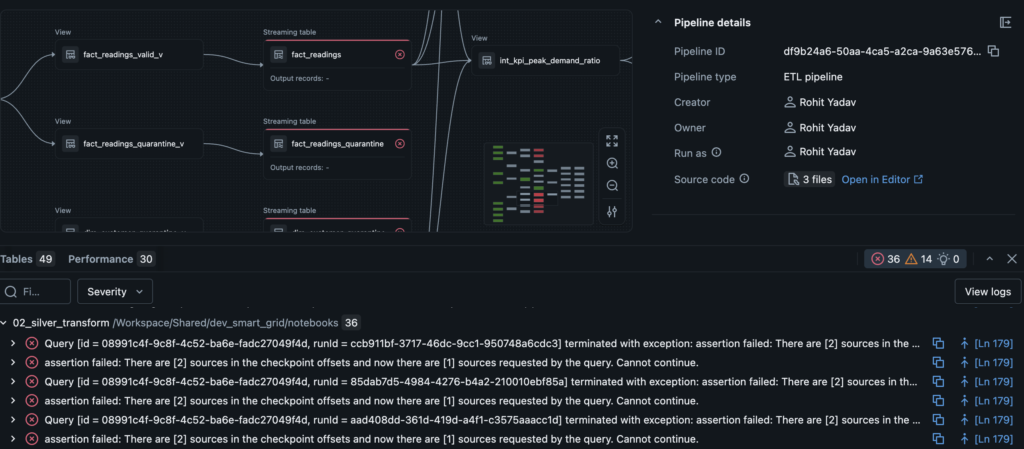
- Spark Structured Streaming bakes the number of sources into each checkpoint. It’s a positional array, not a named map. When you go from two sources to one, Spark has no way to know which source was removed, so it refuses to continue rather than guessing. The fix is a
--full-refreshthat deletes all checkpoints and rebuilds from bronze. You pay this cost exactly once during the phase transition. - Cascade errors in the DAG. When one node in the DLT DAG fails, every downstream node reports “Dataset X is defined in the pipeline but could not be resolved.” The first few times, I chased the wrong error. The fix is simple: sort the event log by time ascending and look at the first error. Everything after it is a cascade, not a root cause.
- Fully-qualified table names are mandatory. DLT in Direct Publishing Mode requires
catalog.schema.tableeverywhere. I initially used unqualified names, which worked fine within the bronze notebook. But the moment silver tried to read from bronze across schemas, it failed with “could not be resolved.” Always use three-part names. - DQX API drift. DQX renamed
min/maxtomin_limit/max_limitbetween versions. The error message was clear, but the docs I’d been following were out of date. - Free Edition quirks. The
clientparameter must be"2"(not"1"). The catalog needs an explicitstorage_rootbecause the free tier’s default storage isn’t auto-discovered by the Terraform provider. Serverless compute is the only option.
Intentionally dirty data
The data generators use Faker to produce realistic but messy records. About 10% of names have whitespace padding or inconsistent casing. Around 12% of addresses are null. 5% of foreign keys are orphans (meters pointing to non-existent accounts). Date formats are mixed between ISO 8601, DD/MM/YYYY, and literal strings like "invalid-date". Duplicates are injected into every table.
This was deliberate. Every DQX rule and quarantine path in the pipeline gets exercised. If your test data is clean, you’re not testing your data quality layer.
Infrastructure
Everything is Terraform-managed and reproducible:
| Resource | Purpose |
|---|---|
databricks_catalog | Unity Catalog with explicit S3 storage root |
databricks_schema | bronze, silver, gold, quarantine |
databricks_pipeline | Single DLT pipeline, three notebook libraries |
databricks_job | NRT cron (every 15 min, paused by default) + historical load |
databricks_notebook | Pipeline source notebooks |
databricks_workspace_file | Helper modules, DQ rule YAMLs |
terraform apply hashes local files and only re-uploads what changed. Most edits update one resource and leave the rest alone.
The Makefile
I wrapped the entire lifecycle in Make targets so I wouldn’t have to remember CLI commands across four different tools (terraform, databricks, aws, python):
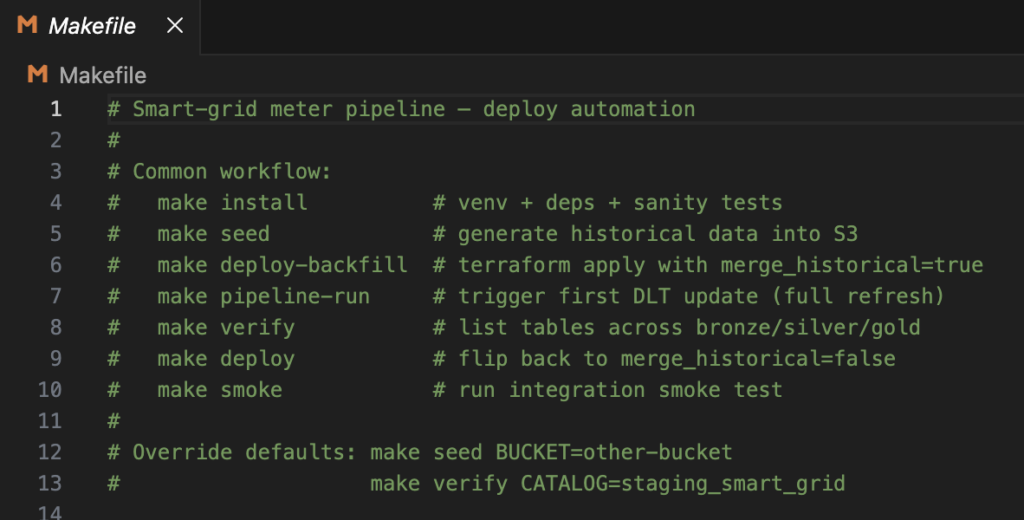
Make is just a task runner here. No dependency-graph magic. The value is that make help documents the deploy sequence for anyone picking up the project.
Takeaways
Databricks Free Edition is more capable than I expected. You can build a real pipeline with DQX validation, SCD modeling, and full Terraform IaC on the free tier if you work within its constraints.
The single concept that explains the most errors is streaming checkpoints. Once you understand that the checkpoint bakes in the source count and source order, half the DLT debugging becomes straightforward.
DLT is essentially dbt + Spark Structured Streaming + Airflow rolled into one. You declare what you want; it figures out how to build it. That’s powerful, but it means the errors you get are DLT’s errors, not yours, and they take some getting used to.
The dual-lane backfill pattern has a one-time cost (a checkpoint rewrite during the phase transition) but the resulting steady state is simple: one source, one checkpoint shape, incremental processing forever.
And if your test data is clean, you’re only testing the happy path. Generate dirty data on purpose.
Source code: GitHub
Deep dive notes: Databricks Learnings